How to use - Python Statement for Process Modeling
Creating a python statement
1. Create a new python statement.
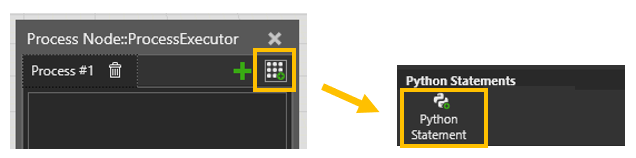
2. Open the script.
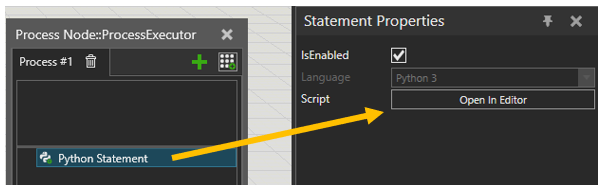
3. Write the script.
See vcPythonStatement and vcStamentent for more information.
import vcCore as vc
import vcProcessModel as vc_pm

app = vc.getApplication()
statement = vc.getStatement()
routine = statement.ParentRoutine
comp = routine.Executor.Component
world = comp.World

statement.Name = "MyPythonDelay"
delay_time = statement.Properties.create(vc.vcPropertyType.REAL, "Delay")


async def OnExecute():
  """Statement is executed. Use 'await' for time-consuming methods."""
  await vc.delay(process_time.Value)
  return


def GetDescription():
  """Sets the displayed statement name in the Process Editor."""
  return statement.Name + " " + str(delay_time.Value) + "s"
Adding a custom python statement
1. Users can also add a custom python statement to the Statement Gallery
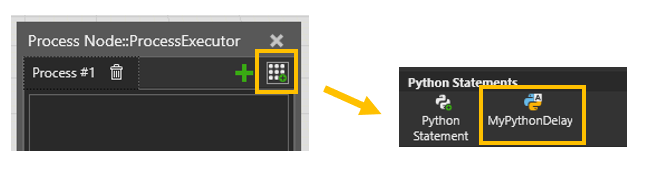
2. A python 3 command can be used for adding a new statement to the gallery. The commands are located in:
C:\Users\%USERNAME%\Documents\Visual Components\5.0\My Commands\Python 3
3. Create a new command script file, for example, cmd_py_statement_to_gallery.py with the following content:
from vcCore import *
import vcExecutor

command = getCommand()
app = getApplication()

def OnInit():
    """
    vcCommand OnInit gets triggered when the application is started.
    """
    command.Name = "MyPythonStatementCommand"
    command.addMenuItem("VcProcessStatements/ProcessStatements/PythonStatements","MyPythonDelay")


def OnExecute():
    """
    vcCommand OnExecute gets triggered when ui item is clicked.
    """
    statement = app.ContextManager.ProcessContext.createStatement(vcExecutor.vcStatementType.PYTHON)
    statement.Script = '''
import vcCore as vc
import vcProcessModel as vc_pm

app = vc.getApplication()
statement = vc.getStatement()
routine = statement.ParentRoutine
comp = routine.Executor.Component
world = comp.World

statement.Name = "MyPythonDelay"
delay_time = statement.Properties.create(vc.vcPropertyType.REAL, "Delay")


async def OnExecute():
  """Statement is executed. Use 'await' for time-consuming methods."""
  await vc.delay(process_time.Value)
  return


def GetDescription():
  """Sets the displayed statement name in the Process Editor."""
  return statement.Name + " " + str(delay_time.Value) + "s"
'''
Access Routine Variables
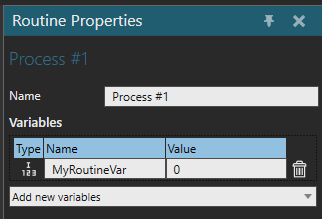
Use the routine's properties to access the routine variables.
routine_var = routine.Properties["MyRoutineVar"]